> ## Documentation Index
> Fetch the complete documentation index at: https://luminouslabs-cc5545c6-swen-upd.mintlify.site/llms.txt
> Use this file to discover all available pages before exploring further.

# Overview

> Overview to guides for Solana programs to create, update, close, reinitialize, and burn permanently compressed accounts.

| Guide                                                                                               | Description                                                                  |
| --------------------------------------------------------------------------------------------------- | ---------------------------------------------------------------------------- |
| [Create Compressed Accounts](/compressed-pdas/guides/how-to-create-compressed-accounts)             | Create compressed accounts with address                                      |
| [Update Compressed Accounts](/compressed-pdas/guides/how-to-update-compressed-accounts)             | Update compressed accounts                                                   |
| [Close Compressed Accounts](/compressed-pdas/guides/how-to-close-compressed-accounts)               | Close compressed accounts, retain the address                                |
| [Reinitialize Compressed Accounts](/compressed-pdas/guides/how-to-reinitialize-compressed-accounts) | Reinitialize closed compressed accounts with the same address and new values |
| [Burn Compressed Accounts](/compressed-pdas/guides/how-to-burn-compressed-accounts)                 | Burn compressed accounts and their address permanently                       |

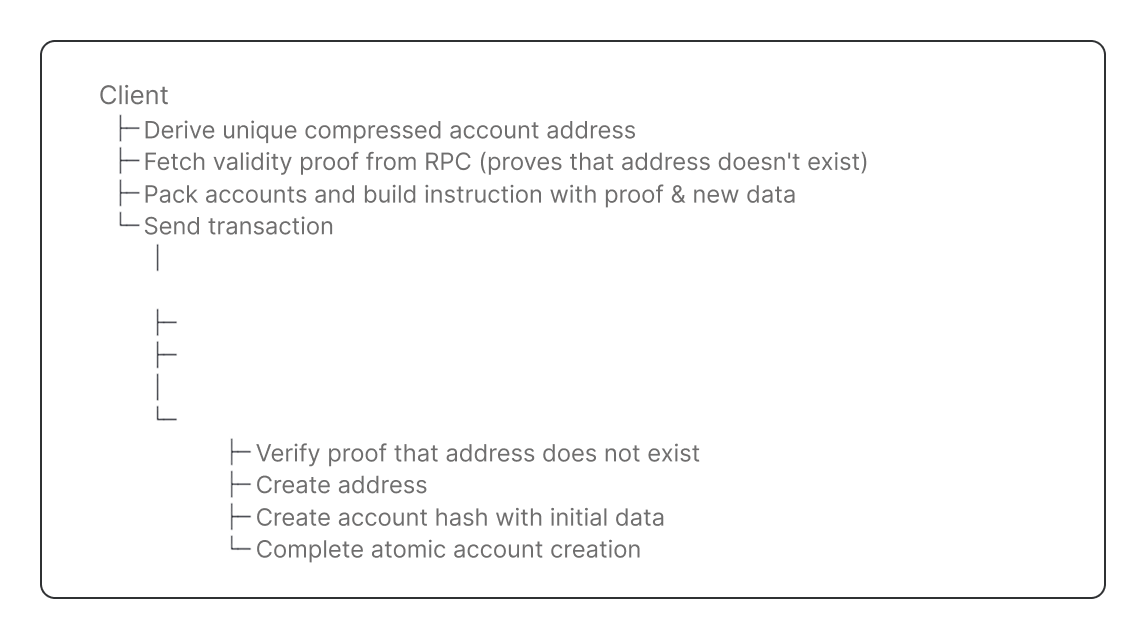
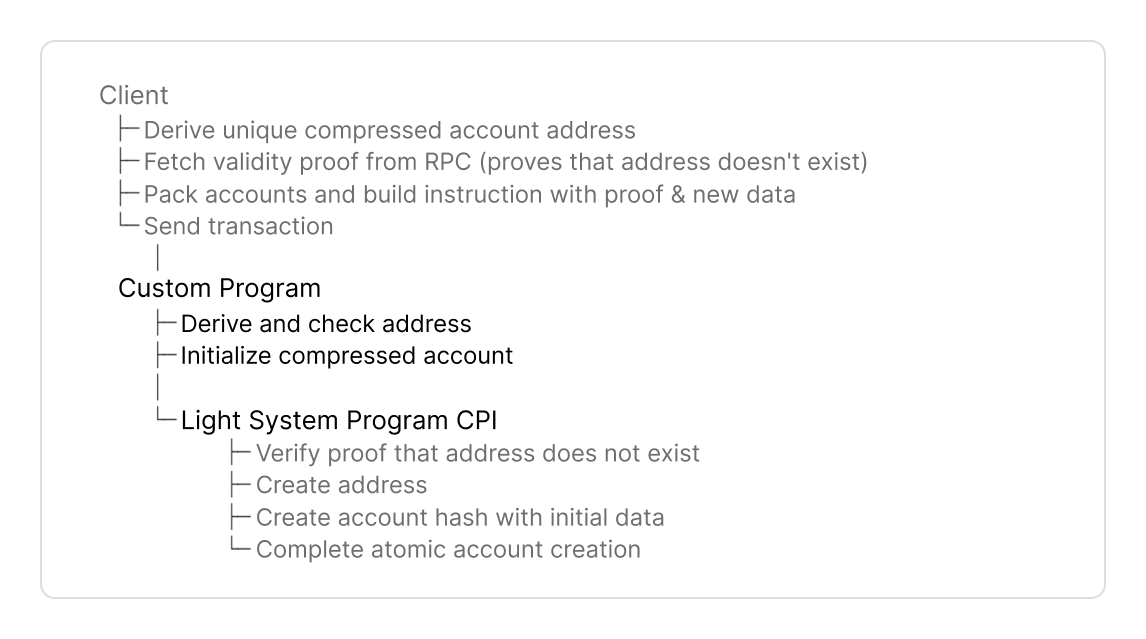
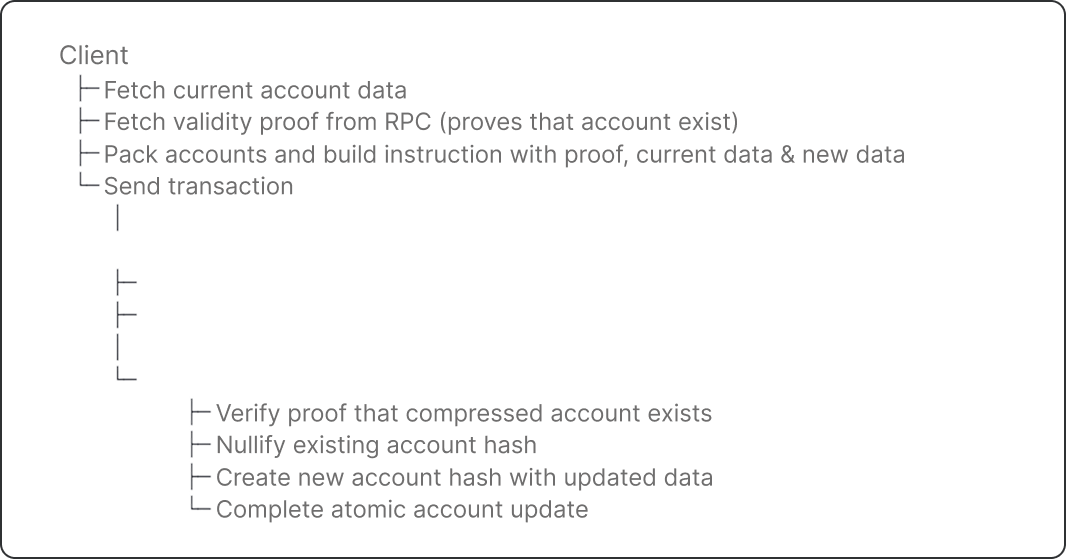
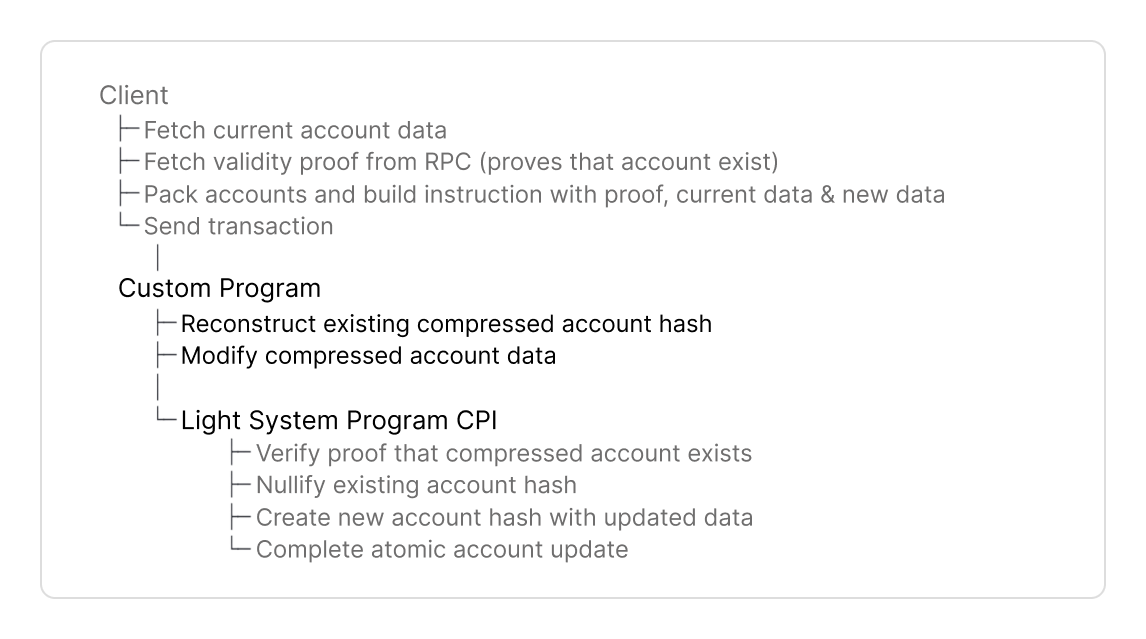
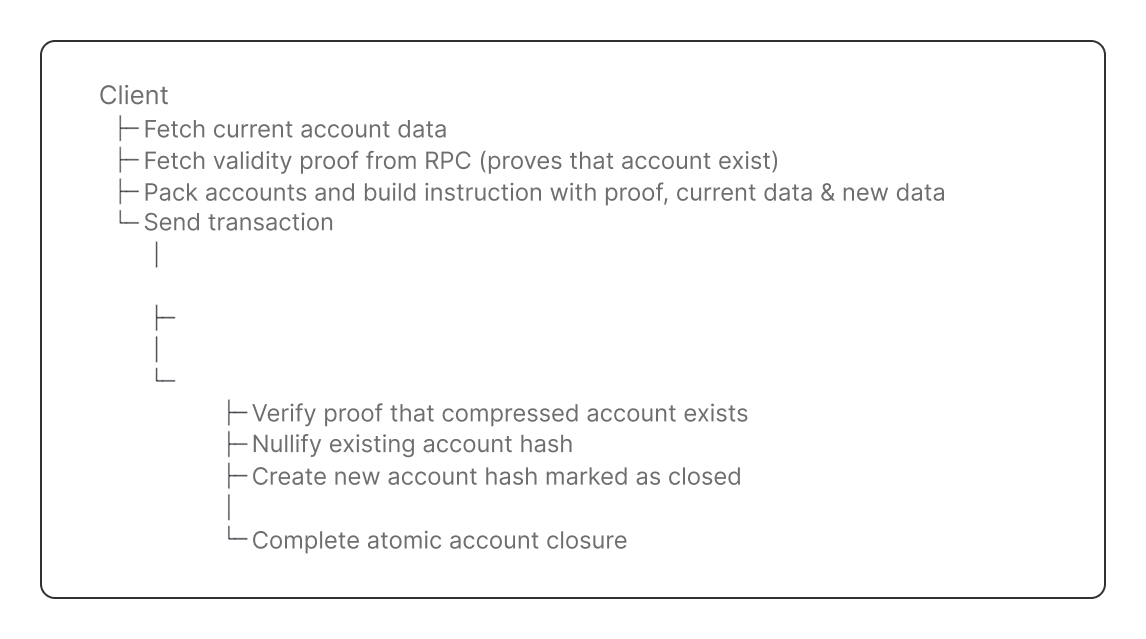
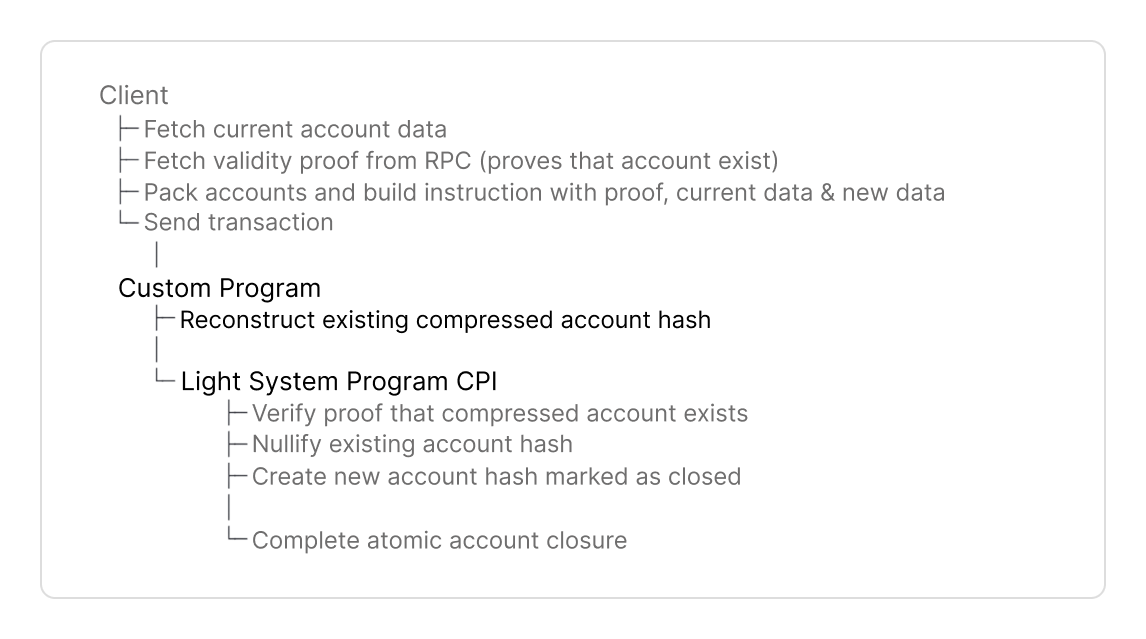
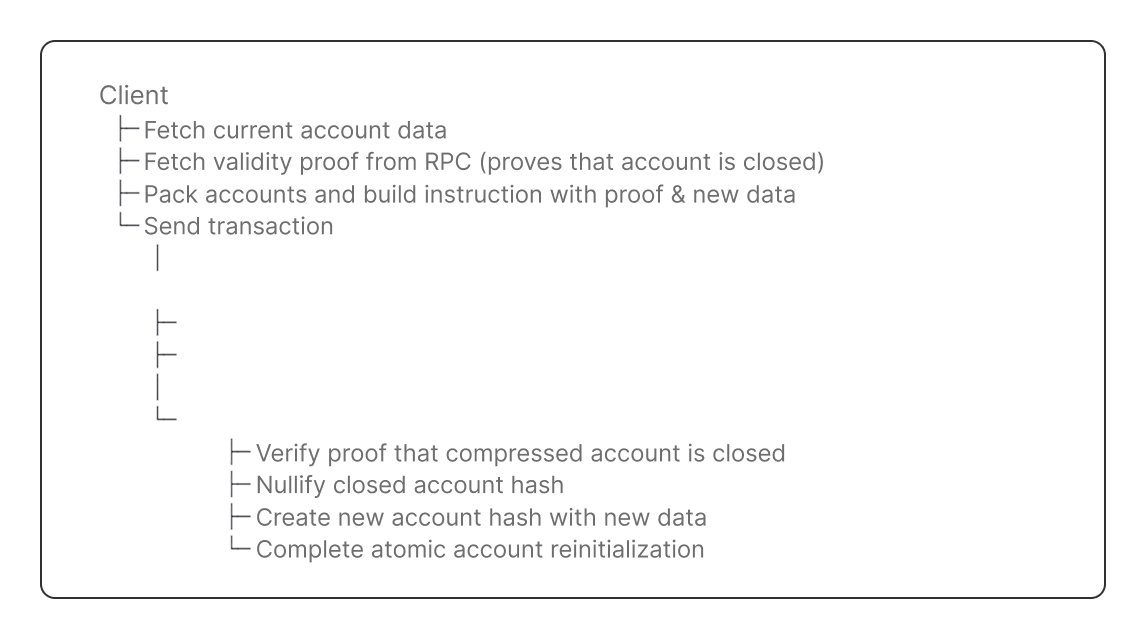
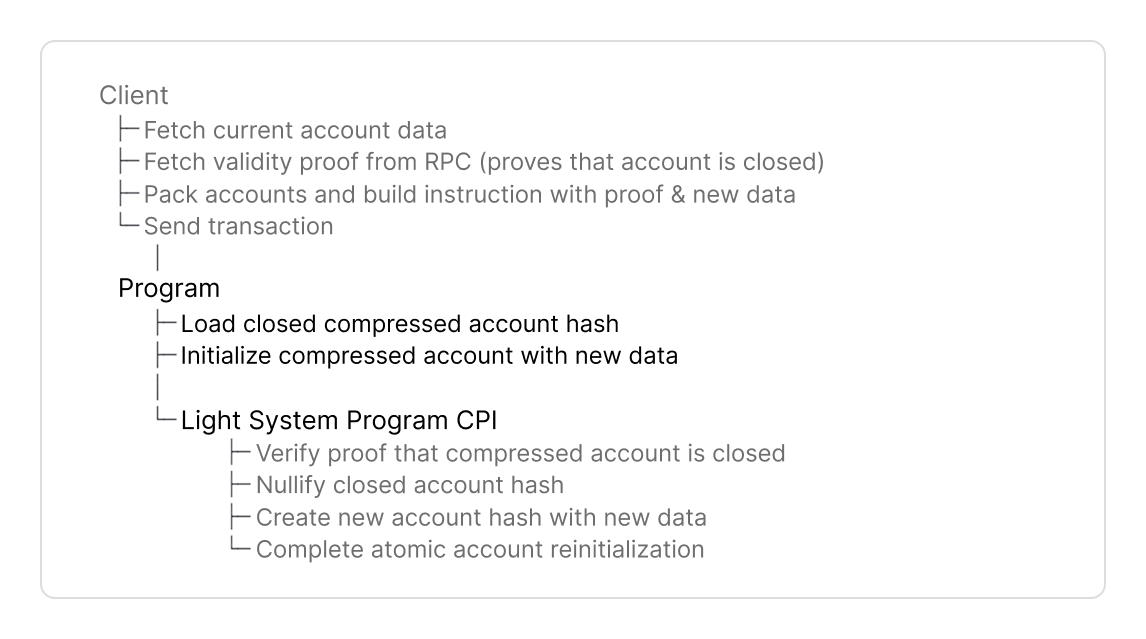
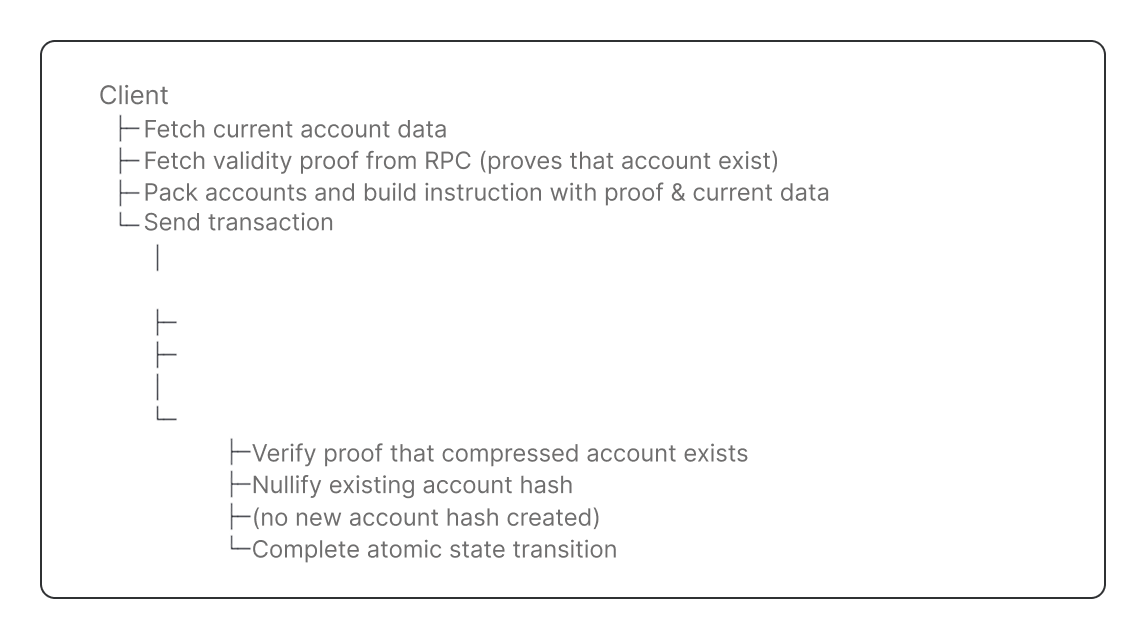
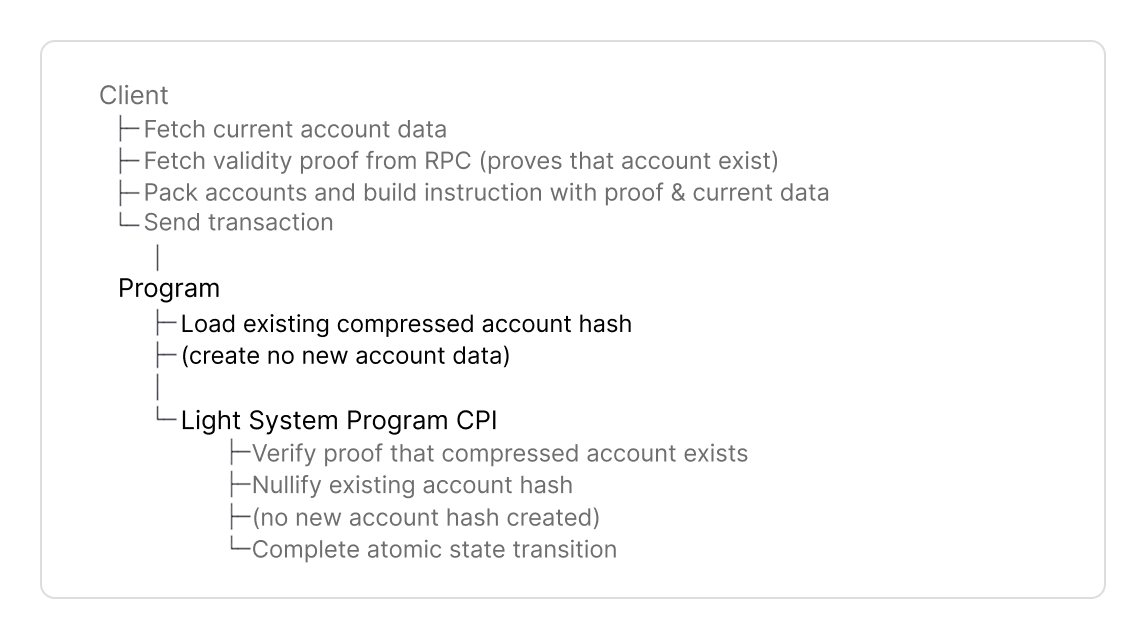
Here is the complete flow to create, or interact with compressed accounts:

<Tabs>
  <Tab title="Create">
    <div className="hidden dark:block">
      <Frame>
        <img src="https://mintcdn.com/luminouslabs-cc5545c6-swen-upd/CLvaY_EKMEUGhA6q/images/Untitled.png?fit=max&auto=format&n=CLvaY_EKMEUGhA6q&q=85&s=2d6d709d46ddcbd6bcab30c2b1de176e" alt="" width="1146" height="639" data-path="images/Untitled.png" />
      </Frame>
    </div>

    <div className="block dark:hidden">
      <Frame>
        <img src="https://mintcdn.com/luminouslabs-cc5545c6-swen-upd/DFU__Fi69mNIjyec/images/image-22.png?fit=max&auto=format&n=DFU__Fi69mNIjyec&q=85&s=4c8e0d3eb51b28b7dbd85fb94d35335b" alt="" width="1146" height="639" data-path="images/image-22.png" />
      </Frame>
    </div>
  </Tab>

  <Tab title="Update">
    <div className="hidden dark:block">
      <Frame>
        <img src="https://mintcdn.com/luminouslabs-cc5545c6-swen-upd/CLvaY_EKMEUGhA6q/images/Untitled-1.png?fit=max&auto=format&n=CLvaY_EKMEUGhA6q&q=85&s=6a25d39ff3988ca374ad92d76e9e4d89" alt="" width="1066" height="559" data-path="images/Untitled-1.png" />
      </Frame>
    </div>

    <div className="block dark:hidden">
      <Frame>
        <img src="https://mintcdn.com/luminouslabs-cc5545c6-swen-upd/DFU__Fi69mNIjyec/images/image-20.png?fit=max&auto=format&n=DFU__Fi69mNIjyec&q=85&s=4599756b67ca57d457e0bd87b959f905" alt="" width="1146" height="639" data-path="images/image-20.png" />
      </Frame>
    </div>
  </Tab>

  <Tab title="Close">
    <div className="hidden dark:block">
      <Frame>
        <img src="https://mintcdn.com/luminouslabs-cc5545c6-swen-upd/CLvaY_EKMEUGhA6q/images/Untitled-4.png?fit=max&auto=format&n=CLvaY_EKMEUGhA6q&q=85&s=e357f5859d5d3afedaba8320735f4434" alt="" width="1146" height="639" data-path="images/Untitled-4.png" />
      </Frame>
    </div>

    <div className="block dark:hidden">
      <Frame>
        <img src="https://mintcdn.com/luminouslabs-cc5545c6-swen-upd/DFU__Fi69mNIjyec/images/image-23.png?fit=max&auto=format&n=DFU__Fi69mNIjyec&q=85&s=ed1ffe79d2227f8bd5c7ce5c30fb3f2d" alt="" width="1146" height="639" data-path="images/image-23.png" />
      </Frame>
    </div>
  </Tab>

  <Tab title="Reinitialize">
    <div className="hidden dark:block">
      <Frame>
        <img src="https://mintcdn.com/luminouslabs-cc5545c6-swen-upd/DFU__Fi69mNIjyec/images/program-reinit-1.png?fit=max&auto=format&n=DFU__Fi69mNIjyec&q=85&s=4ecc14879c3005d3345e0fde3d09538b" alt="" width="1146" height="639" data-path="images/program-reinit-1.png" />
      </Frame>
    </div>

    <div className="block dark:hidden">
      <Frame>
        <img src="https://mintcdn.com/luminouslabs-cc5545c6-swen-upd/DFU__Fi69mNIjyec/images/program-reinit.png?fit=max&auto=format&n=DFU__Fi69mNIjyec&q=85&s=cd2bddddb0bfb581bea6bee977f49c6f" alt="" width="1146" height="639" data-path="images/program-reinit.png" />
      </Frame>
    </div>
  </Tab>

  <Tab title="Burn">
    <div className="hidden dark:block">
      <Frame>
        <img src="https://mintcdn.com/luminouslabs-cc5545c6-swen-upd/DFU__Fi69mNIjyec/images/program-burn-1.png?fit=max&auto=format&n=DFU__Fi69mNIjyec&q=85&s=81ff86cb21d46abac3fc93e70fbdb615" alt="" width="1146" height="639" data-path="images/program-burn-1.png" />
      </Frame>
    </div>

    <div className="block dark:hidden">
      <Frame>
        <img src="https://mintcdn.com/luminouslabs-cc5545c6-swen-upd/DFU__Fi69mNIjyec/images/program-burn.png?fit=max&auto=format&n=DFU__Fi69mNIjyec&q=85&s=7b431ac3c648e683c34da5107a5d03c4" alt="" width="1146" height="639" data-path="images/program-burn.png" />
      </Frame>
    </div>
  </Tab>
</Tabs>

## Next Steps

<Card title="Create a program with compressed accounts" icon="chevron-right" color="#0066ff" href="/compressed-pdas/guides/how-to-create-compressed-accounts" horizontal />